Python爬虫入门(2)————最易上手的豆瓣爬虫

关键词:爬虫,豆瓣

这一节,我们讨论一下最简单的如何爬取豆瓣上的数据。

豆瓣的网页页面因为十分简单,因此,没有必要提供 cookie 以及其他一些选项,直接爬取即可:
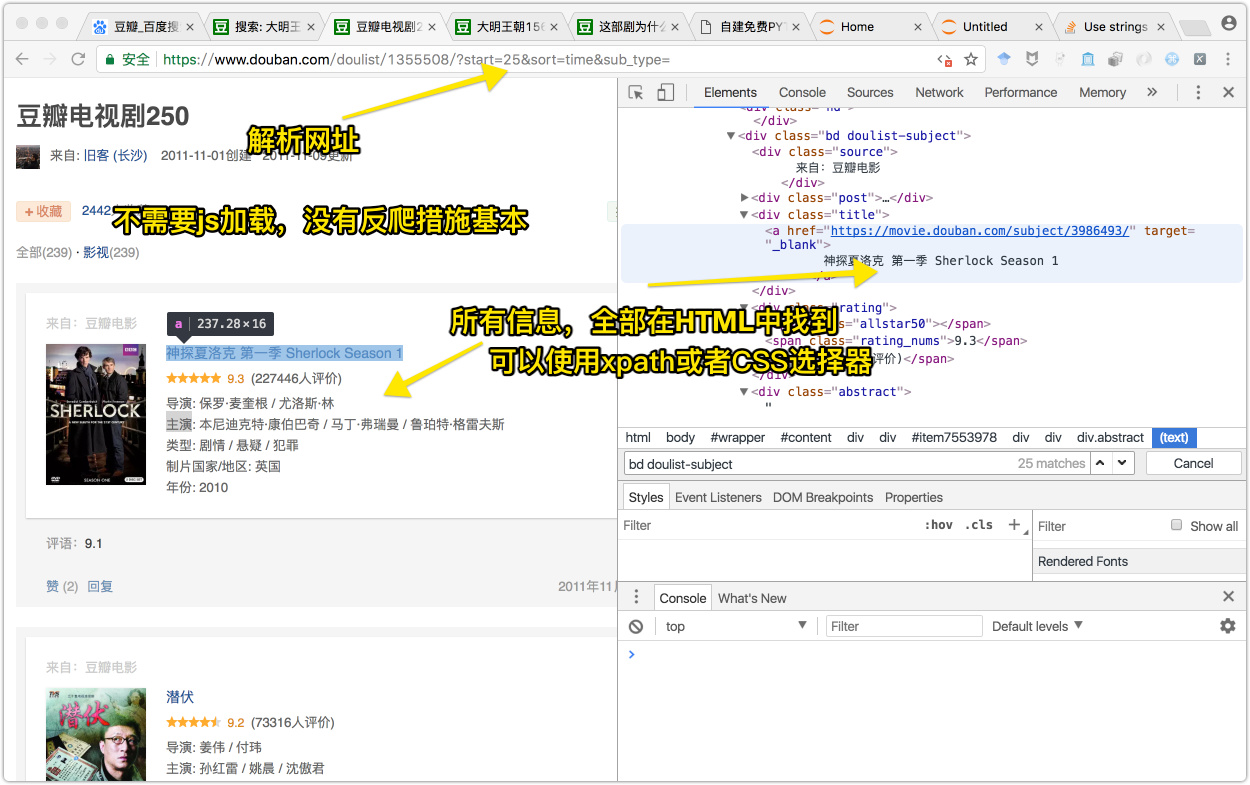
这段代码使用没有使用函数,直接一步步爬取了

1
2
3
4
5
6
7
8
9
10
11
12
13
14
15
16
17
18
19
20
21
22
23
24
25
26
27
28
29
30
31
32
33
34
#import the necessary modules
import requests
from lxml import etree
# //*[@id="item7553978"]//div/div[2]/div[3]/a
# //*[@id="item7553977"]/div/div[2]/div[3]/a
# //*[@id="item7553978"]/div/div[2]/div[4]/span[2]
# //*[@id="item7553978"]/div/div[2]/div[5]/text()[1]
# //*[@id="item7553978"]/div/div[2]/div[5]/text()[2]
#etree.HTML()返回一个HTML对象,xpath返回一个列表
for i in range(0,10):
url_test = 'https://www.douban.com/doulist/1355508/?start=%d&sort=time&sub_type='%(i*25)
douBanHtml = requests.get(url_test) #获得所有的网页信息,包括状态码等
douBanHtmlContent = douBanHtml.text # 获取所有的HTML内容
douBanEleObj = etree.HTML(douBanHtmlContent) #返回一个HTML的Element对象
names = douBanEleObj.xpath('//div/div[2]/div[3]/a/text()') #获取电视名字,返回值是一个列表
stars = douBanEleObj.xpath('//div/div[2]/div[4]/span[2]/text()') #获取电视星级,返回列表
info = ['directors','mainActors','types','countrys','years']
detailDict = {}
for num in range(0,5):
detailDict[info[num]] = douBanEleObj.xpath('//div/div[2]/div[5]/text()[num+1]')
for name,star,director,mainActor,typed,country,year in zip(names,stars,detailDict[info[0]],detailDict[info[1]],detailDict[info[2]],detailDict[info[3]],detailDict[info[4]]):
dict = {
'name' : name,
'star' : star,
'director' : director,
'mainActor' : mainActor,
'type' : typed,
'country' : country,
'year' : year
}
print(dict)

函数版

1
2
3
4
5
6
7
8
9
10
11
12
13
14
15
16
17
18
19
20
21
22
23
24
25
26
27
28
29
30
31
32
33
34
35
36
37
38
39
40
41
42
43
44
45
46
import requests
from lxml import etree
#获取所有的URL
def getUrl():
startUrl = 'https://www.douban.com/doulist/1355508/?start=%d&sort=time&sub_type='
urlList = []
for num in range(10):
urlList.append(startUrl%(num*25))
return urlList
#获取所有需要解析的网页对象
def getHtmlEleObj(url_need):
douBanHtml = requests.get(url_need).text
douBanEleObj = etree.HTML(douBanHtml)
return douBanEleObj
#解析网页元素
def parseHtml():
for url in getUrl():
etreeHtmlObj = getHtmlEleObj(url)
names = etreeHtmlObj.xpath('//div/div[2]/div[3]/a/text()')
stars = etreeHtmlObj.xpath('//div/div[2]/div[4]/span[2]/text()')
directors = etreeHtmlObj.xpath('//div/div[2]/div[5]/text()[1]')
mainActors = etreeHtmlObj.xpath('//div/div[2]/div[5]/text()[2]')
types = etreeHtmlObj.xpath('//div/div[2]/div[5]/text()[3]')
countrys = etreeHtmlObj.xpath('//div/div[2]/div[5]/text()[4]')
years = etreeHtmlObj.xpath('//div/div[2]/div[5]/text()[5]')
for name,star,director,mainActor,typed,country,year in zip(names,stars,directors,mainActors,types,countrys,years):
dict = {
'名字' : name.strip(),
'星级平定' : float(star.strip()),
'导演' : director.strip().split(':')[1].split('/'),
'主演' : mainActor.strip().split(':')[1].split('/'),
'类型' : typed.strip().split(':')[1].split('/'),
'国家' : country.strip().split(':')[1],
'年份' : year.strip().split(':')[1]
}
print(dict)
if __name__ == '__main__':
parseHtml()

存储到数据库

1
2
3
4
5
6
7
8
9
10
11
12
from pymongo import MongoClient
#存储到数据库
#建立一个mongoDB对象
client = MongoClient('localhost', 27017)
#建立一个数据库名称为doubanDB
doubanDB = client.doubanDB
#在数据库下建立一张表
soapOpera = doubanDB.soapOpera
#在表中插入我们要存储的数据
soapOpera.insert_one(dict)

合起来的程序如下:

1
2
3
4
5
6
7
8
9
10
11
12
13
14
15
16
17
18
19
20
21
22
23
24
25
26
27
28
29
30
31
32
33
34
35
36
37
38
39
40
41
42
43
44
45
46
47
48
49
50
51
52
53
54
55
#import the necessary modules
import requests
from lxml import etree
from pymongo import MongoClient
from fake_useragent import UserAgent
import time
useragent = UserAgent().random
headers = {
'User-Agent' : useragent
}
def getUrl():
startUrl = 'https://www.douban.com/doulist/45910500/?start={}&sort=time&sub_type='
urlList = []
for num in range(42):
urlList.append(startUrl.format(num*25))
return urlList
def getHtmlEleObj(url_need):
douBanHtml = requests.get(url_need, headers = headers).text
douBanEleObj = etree.HTML(douBanHtml)
return douBanEleObj
def parseHtml():
for url in getUrl():
etreeHtmlObj = getHtmlEleObj(url)
names = etreeHtmlObj.xpath('//div/div[2]/div[3]/a/text()')
stars = etreeHtmlObj.xpath('//div/div[2]/div[4]/span[2]/text()')
directors = etreeHtmlObj.xpath('//div/div[2]/div[5]/text()[1]')
mainActors = etreeHtmlObj.xpath('//div/div[2]/div[5]/text()[2]')
types = etreeHtmlObj.xpath('//div/div[2]/div[5]/text()[3]')
countrys = etreeHtmlObj.xpath('//div/div[2]/div[5]/text()[4]')
years = etreeHtmlObj.xpath('//div/div[2]/div[5]/text()[5]')
for name,star,director,mainActor,typed,country,year in zip(names,stars,directors,mainActors,types,countrys,years):
dict = {
'名字' : name.strip(),
'星级平定' : star.strip(),
'导演' : director.strip().split(':')[1].split('/'),
'主演' : mainActor.strip().split(':')[1].split('/'),
'类型' : typed.strip().split(':')[1].split('/'),
'国家' : country.strip().split(':')[1],
'年份' : year.strip().split(':')[1]
}
client = MongoClient('localhost', 27017)
doubanDB = client.豆瓣七点五分电影集合
soapOpera = doubanDB.电影
soapOpera.insert_one(dict)
# print(dict)
time.sleep(1)
if __name__ == '__main__':
parseHtml()